From autonomous agents to adaptive software, we're entering a new era of human-computer interaction. These are the emerging design patterns that define the future of AI.
Published: 2025-11-15
Summary
For years, the primary way we interacted with AI was through a simple chat box. But as artificial intelligence becomes more capable, a new generation of user interfaces is emerging to manage its power. This article explores the cutting-edge design patterns that are shaping the future of software, moving beyond static buttons and forms to dynamic, action-oriented experiences. We examine how designers are tackling core challenges like latency in voice AI, building trust in agent-generated data, managing user attention during long generation times, and creating interfaces that adapt to their context. By analyzing several innovative products, we identify key principles for creating intuitive, powerful, and trustworthy AI-native applications. These patterns, from visual workflow canvases to low-fidelity previews, offer a glimpse into a world where software is less a set of tools and more a collaborative partner.
Key Takeaways
- AI is shifting software design from static 'nouns' (buttons, forms) to dynamic 'verbs' (workflows, suggestions, autonomous actions).
- For voice AI, perceived latency is a critical UI element; delays over 200 milliseconds can break the illusion of natural conversation.
- Visual canvases, modern-day flowcharts, are becoming a standard way to build, monitor, and control complex AI agent workflows.
- To build user trust and combat AI 'hallucinations,' providing verifiable, in-line sources for any generated data is a crucial design pattern.
- Managing the 'waiting problem' of generative AI requires creative solutions like low-fidelity previews, progress logs, and iterative editing to keep users engaged.
- Adaptive interfaces, which change based on content and context, offer powerful shortcuts but must balance relevance with the user's need for predictability.
- Old design paradigms, like footnotes and flowcharts, are being repurposed to solve new problems in the AI era, such as verification and process management.
- The ability to interrupt an AI (known as 'barge-in') is a key feature for making voice interactions feel more human and less robotic.
- Iterative refinement—allowing users to make small, targeted changes to an AI's output—is more efficient than regenerating an entire result from scratch.
Article
For the past several years, our primary portal into the world of artificial intelligence has been the chat box. A simple, text-based conversation has been the default way to interact with large language models (LLMs). But as AI's capabilities expand from answering questions to performing complex, multi-step tasks, this single interface is proving insufficient. We are now entering a new era of human-computer interaction, one that requires a richer and more diverse set of design patterns.
The fundamental shift is from a world of static software to a dynamic one. As one product designer noted, traditional software is built around nouns: buttons, forms, dropdowns, and text fields. They are fixed objects you act upon. AI-native software, in contrast, is built around verbs: summarizing, generating, automating, and connecting. The interface must now manage processes, not just present objects. This requires new ways of thinking about control, trust, and time.
Let's explore the key design patterns emerging from this new frontier.

The evolution of UI design is moving from static 'nouns' to dynamic, AI-powered 'verbs'.
License: Unknown
The Conversational Interface, Refined
Voice AI is one of the most immediate and intuitive ways to interact with machines, but making it feel natural is extraordinarily difficult. The illusion of human conversation is fragile and can be shattered by subtle technical failures.
Latency is the Interface
When you speak with another person, the rhythm of the conversation—the pauses, the interruptions, the speed of response—is as important as the words themselves. The same holds true for voice AI. The time it takes for an AI to respond after you finish speaking, known as latency, is not just a technical metric; it's a core part of the user experience.
Research shows that in human conversation, gaps of more than 200-250 milliseconds start to feel awkward or unnatural . When a voice agent takes too long to reply, it immediately feels robotic. This is why some of the most effective voice AI platforms for developers now display the latency of each response in milliseconds. This transparency helps developers build an intuition for what feels right, turning a technical spec into a tangible design goal.
Another crucial element is the ability to interrupt. In a natural conversation, people talk over each other. This is called 'barge-in' in the world of voice UI. An AI that plows through its pre-programmed script even when a user tries to interject, as seen in some demonstrations, instantly breaks the conversational spell. Sophisticated systems must be able to stop, listen, and react in real-time.
Beyond Voice: The Need for Multimodal Feedback
When an interaction happens purely through voice, the user is deprived of visual cues. If you're using a voice interface on a device with a screen, that's a missed opportunity. Good design pairs audio with visual feedback. For example, a subtle animation can show that the system is listening, and another can indicate that it's processing or speaking. Without these cues, a user whose device is muted might think the application is broken, not realizing the AI is responding audibly.
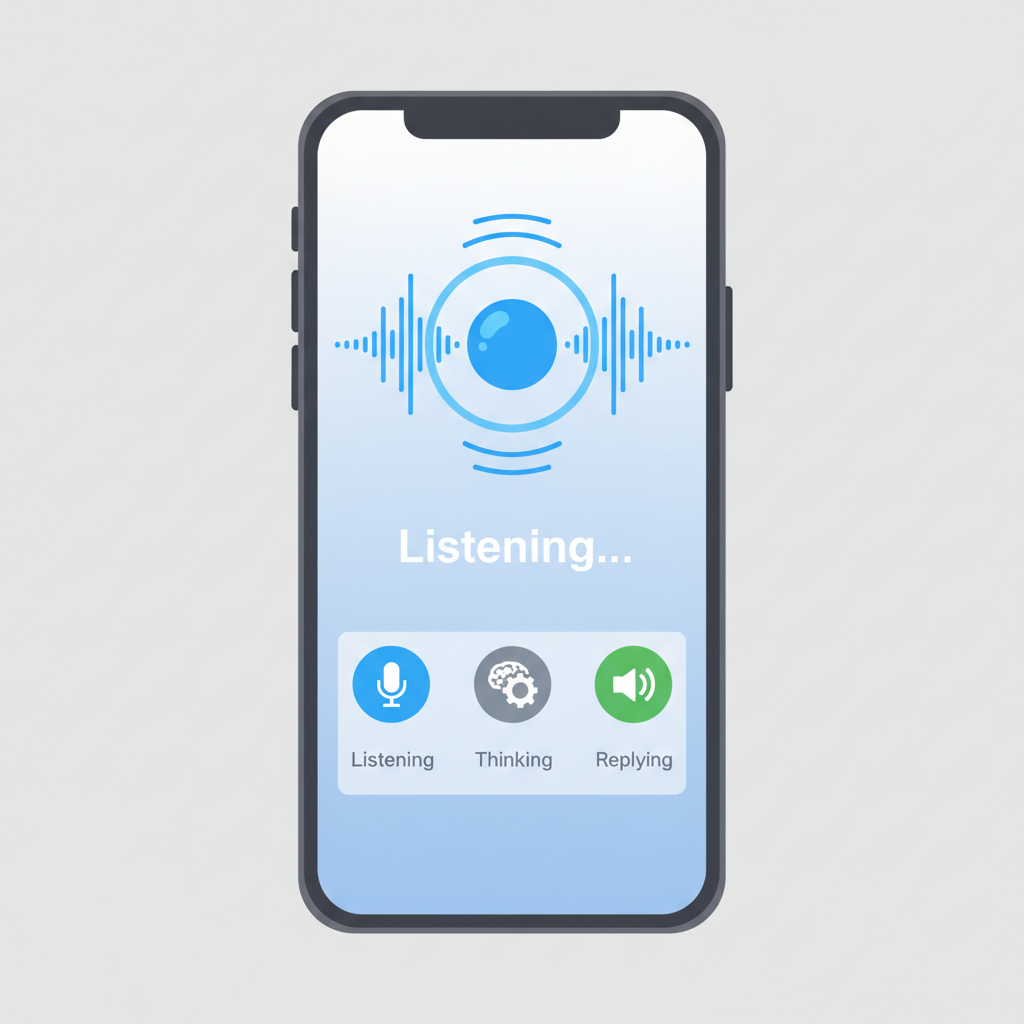
Effective voice AI pairs audio with clear visual feedback to keep the user informed.
License: Unknown
Taming Complexity with Visual Workflows
One of the most powerful applications of AI is the creation of autonomous agents—programs that can perform multi-step tasks on their own, like scraping websites, qualifying leads, or managing operations. But giving an AI that much autonomy raises a critical question: how do you control and monitor it?
The Modern Flowchart for AI Agents
The answer, it seems, is a return to a classic tool: the flowchart. New AI automation platforms are using visual canvases where users can map out an agent's workflow step-by-step. Each node in the chart represents an action (e.g., 'Get Input,' 'Scrape URL,' 'Extract Data'), and the connections show the flow of logic. This visual paradigm has several advantages:
- Clarity: It makes a complex, invisible process transparent and understandable to a non-technical user.
- Control: Users can customize the workflow, adding, removing, or reconfiguring steps without writing any code.
- Monitoring: It provides a dashboard for overseeing the agent's execution, making it easier to debug when things go wrong.
This isn't a new idea. Visual programming languages have existed for decades in fields like engineering and data science . But their application to orchestrating LLM-based agents is a powerful revival of the concept. The real power of this model emerges in non-linear, branching workflows, where an agent must make decisions based on incoming data—something that is difficult to represent in a simple list or document.
[[IMG3]]
Building Trust in a World of Generated Data
LLMs are notorious for 'hallucinating'—confidently stating incorrect information . When AI agents are tasked with gathering and structuring data from the web, how can a user trust the output? This is not just a technical problem of model accuracy; it's a fundamental design challenge.
The Critical Role of Citing Sources
The most effective pattern to emerge here is borrowed directly from academia: the footnote. Just as a research paper cites its sources to back up its claims, a trustworthy AI must show its work.
We see this in AI-powered data tools that turn a simple prompt (e.g., "AI companies in San Francisco") into a structured spreadsheet. When a user clicks on a generated data point, like a company's funding amount, the interface shows the specific source articles the AI used to find that information. This simple feature is transformative:
- It makes data verifiable. The user can instantly check the source to confirm the AI's finding.
- It builds trust. Even if the AI is occasionally wrong, its transparency gives the user the tools to catch errors.
- It provides context. Sources help the user understand the nuances of the data (e.g., was this funding from a single round or a cumulative total?).
This practice of source-based generation is a cornerstone of Explainable AI (XAI) and is becoming a standard expectation for any AI tool that presents factual information [4, 5].
The Art of Waiting: Designing for Generative AI's Pace
Generating a complex output—whether it's a webpage design, a high-resolution image, or a video—takes time. A user might have to wait anywhere from ten seconds to ten minutes. Leaving them staring at a static loading spinner is a recipe for frustration and abandonment. This 'waiting problem' has spurred a number of creative design solutions.
Trading Fidelity for Immediacy
One of the most clever strategies is to provide a low-fidelity preview almost instantly, allowing the user to iterate and make changes before committing to the full, time-consuming generation process.
For example, an AI video generation tool might first create the audio track for a script, which is relatively fast. It then plays this audio over a blurred, generic version of the video. This allows the user to check the pacing, tone, and wording immediately. Once they're happy with the audio, they can initiate the final video render, which might take several minutes to match the lip movements perfectly. This is analogous to how flight search engines show you a few initial results quickly while continuing to search for more options in the background .
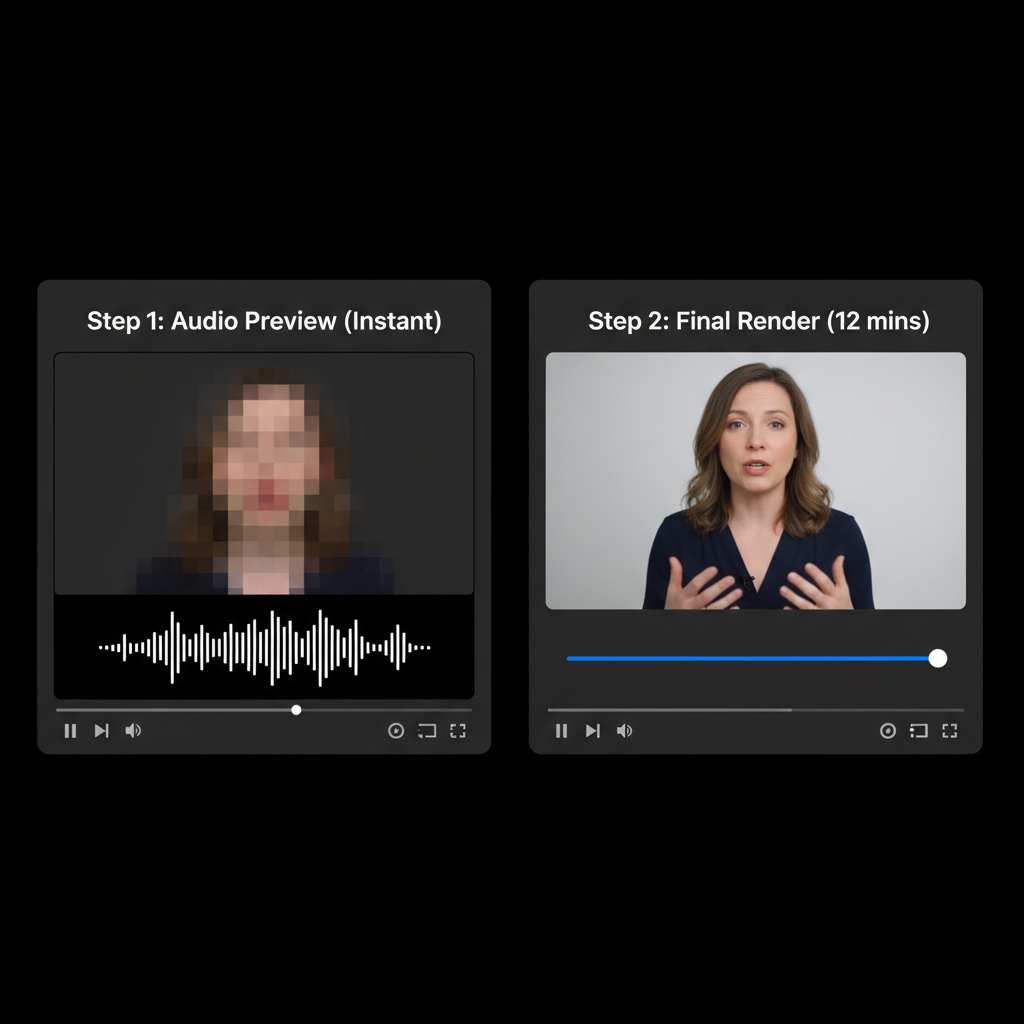
By providing a fast, low-fidelity preview, generative tools allow users to iterate quickly before committing to a slow final render.
License: Unknown
Iterative Refinement over Regeneration
When a generated output is almost perfect, the last thing a user wants to do is start over with a new prompt and wait all over again. The best interfaces allow for iterative refinement.
In a tool that generates a user interface from a text prompt, a user shouldn't have to rewrite the entire prompt to change a button's color. Instead, they should be able to click on the specific element and give a sub-prompt, like "make this sidebar blue." The system then only needs to re-generate that small part of the design, which is faster and preserves the rest of the work. This ability to handle 'diffs' or incremental changes is crucial for making generative tools feel efficient and collaborative.
Software That Adapts to You
Perhaps the most futuristic pattern is the adaptive interface—a UI that dynamically changes based on the content it's presenting. Instead of a static toolbar with dozens of buttons for every possible action, an adaptive UI shows only the few options that are most relevant to the current context.
An email app, for instance, might analyze an incoming message about scheduling a meeting and automatically display buttons like "Confirm a Time," "Suggest New Times," or "Decline." For a different email, these buttons would change. This is powerful because it reduces cognitive load and surfaces the most likely next steps.
The Predictability Trade-Off
However, adaptive interfaces come with a significant trade-off: they sacrifice predictability. Users often rely on muscle memory, knowing exactly where a button is without having to look for it . If the interface is constantly changing, it can be disorienting. A key design challenge is to find the right balance.
One solution is to anchor the adaptive elements with consistency. In the email example, while the text of the buttons changes, their position might remain the same. Furthermore, assigning stable keyboard shortcuts (e.g., 'Y' for the first suggested action, 'N' for the second) allows users to develop new muscle memory even in a dynamic environment.
Why It Matters: A New Design Paradigm
The shift from chatbots to a diverse ecosystem of AI-native interfaces is more than just a visual refresh. It marks a fundamental change in our relationship with software. We are moving from being direct operators of static tools to becoming supervisors and collaborators with dynamic systems.
This transition is reminiscent of the early 2010s, when the rise of touchscreens forced designers to completely rethink interfaces for mobile devices. We are at a similar inflection point. The patterns emerging today—visual agent control, verifiable data, iterative generation, and adaptive UIs—are the building blocks for the next decade of software. The future of design lies in creating experiences that harness the power of AI while keeping the human user firmly in control, well-informed, and creatively engaged.
Citations
- The communicative functions of silence in human-agent conversations: a research agenda - ACM Digital Library (journal, 2021-09-13) https://dl.acm.org/doi/10.1145/3469595.3473891
- This paper discusses the role of silence and timing in human-agent interaction, corroborating the idea that latency is a critical component of what makes conversation feel natural.
- A review of visual programming languages in the context of data science and machine learning - ResearchGate (journal, 2021-02-18) https://www.researchgate.net/publication/349491133_A_review_of_visual_programming_languages_in_the_context_of_data_science_and_machine_learning
- Provides historical and technical context for the use of visual, node-based interfaces (like flowcharts) for complex technical tasks, supporting the idea that this is a revival of an established paradigm.
- How to Mitigate AI Hallucinations: A Practical Guide - TechTarget (news, 2024-04-10) https://www.techtarget.com/searchenterpriseai/tip/How-to-mitigate-AI-hallucinations-A-practical-guide
- Explains the concept of AI hallucinations and why they are a problem, providing context for why trust and verifiability are so important in AI UI design.
- AI: First, Do No Harm. (And Cite Your Sources.) - Nielsen Norman Group (org, 2023-05-21) https://www.nngroup.com/articles/ai-cite-sources/
- An authoritative source in UX design explicitly recommending that AI should cite its sources to build user trust and allow for fact-checking, directly supporting a core argument of the article.
- Explainable AI (XAI) - IBM Research (org, 2023-01-01) https://www.ibm.com/research/pages/explainable-ai
- Provides a clear definition and overview of Explainable AI, the broader field to which source citation in AI interfaces belongs.
- UX for AI: How to Design for Waiting - Nielsen Norman Group (org, 2024-06-09) https://www.nngroup.com/articles/ux-for-ai-waiting/
- Directly addresses the 'waiting problem' in AI, discussing strategies like showing progress and providing early results, which aligns with the article's analysis of low-fidelity previews.
- The Power of Predictability in UX Design - UX Collective (news, 2023-03-15) https://uxdesign.cc/the-power-of-predictability-in-ux-design-53545c4551c8
- Explains the importance of predictability and consistency in user interface design, providing the theoretical basis for the trade-off discussed in the section on adaptive interfaces.
- Microsoft commits another $10 billion to OpenAI - CNBC (news, 2023-01-23) https://www.cnbc.com/2023/01/23/microsoft-announces-multibillion-dollar-investment-in-chatgpt-maker-openai.html
- Provides accurate, updated funding information for OpenAI, correcting the potentially outdated figure shown in the video's demo.
- Anthropic raises $450 million to build next-gen AI assistants - TechCrunch (news, 2023-05-23) https://techcrunch.com/2023/05/23/anthropic-raises-450-million-to-build-next-gen-ai-assistants/
- Verifies one of the funding numbers mentioned in the demo. While the company has raised much more since, this confirms the specific number shown was accurate at one point in time.
- The future of user interfaces - ACM Interactions (journal, 1999-11-01) https://dl.acm.org/doi/10.1145/336341.336342
- A seminal, older piece that provides historical context on the long-standing goals of HCI, such as creating more natural and adaptive interfaces, showing that current AI trends are building on decades of research.
Appendices
Glossary
- AI Agent: An autonomous program powered by AI that can perform complex, multi-step tasks on behalf of a user with a high degree of independence. Examples include booking travel, conducting market research, or managing a calendar.
- Latency: In user interfaces, the delay between a user's action (like speaking or clicking) and the system's response. In conversational AI, low latency is crucial for making interactions feel natural.
- Adaptive UI: A user interface that dynamically changes its layout, content, or available actions based on the user's context, history, or the content being displayed.
- Multimodal Interface: An interface that uses multiple modes of communication between the user and the system, such as voice, touch, visuals, and text, often simultaneously.
- Explainable AI (XAI): A field of artificial intelligence focused on creating systems whose decisions and outputs can be understood by humans. Citing sources is a practical application of XAI principles.
Contrarian Views
- Adaptive UIs can harm usability by violating the principle of consistency. Users may become frustrated if buttons and options constantly move, preventing the formation of muscle memory.
- Visual workflow builders, while intuitive at first, can become unmanageably complex ('node hell'), making them harder to debug and maintain than well-structured code.
- Focusing too much on mimicking human conversation (e.g., ultra-low latency) may be unnecessary for many tasks. A slightly slower, more deliberate 'robotic' interaction can be more predictable and less prone to error.
Limitations
- This article analyzes a small, curated set of emerging products. These design patterns are still evolving and may not all become industry standards.
- The focus is primarily on the user-facing interface, with less discussion of the underlying model architecture and technical constraints that heavily influence these design choices.
- The examples are drawn from startups in the current tech landscape; the approaches taken by large, established software companies may differ significantly.
Further Reading
- AI UX: The Paradox of Choice and the Illusion of Control - https://www.nngroup.com/articles/ai-paradox-of-choice/
- Designing AI-Powered Products - https://hbr.org/2021/06/designing-ai-powered-products
- Human-Centered AI: A Multidisciplinary Perspective - https://hai.stanford.edu/news/human-centered-ai-multidisciplinary-perspective
Recommended Resources
- Signal and Intent: A publication that decodes the timeless human intent behind today's technological signal.
- Thesis Strategies: Strategic research excellence — delivering consulting-grade qualitative synthesis for M&A and due diligence at AI speed.
- Blue Lens Research: AI-powered patient research platform for healthcare, ensuring compliance and deep, actionable insights.
- Outcomes Atlas: Your Atlas to Outcomes — mapping impact and gathering beneficiary feedback for nonprofits to scale without adding staff.
- Qualz.ai: Transforming qualitative research with an AI co-pilot designed to streamline data collection and analysis.